How to Delete Remote Origin Git: A Comprehensive Guide to Clearing Your Repository's Past
In the realm of software development, version control systems like Git play an indispensable role. They allow developers to track changes, collaborate effectively, and maintain a detailed history of their projects. However, there are times when the need arises to sever ties with the past, to wipe the slate clean, and start afresh. This is where the operation of deleting the remote origin in Git comes into play.
The concept of deleting remote origin Git might seem daunting at first, especially to those unfamiliar with the intricacies of the system. However, understanding this process is crucial for maintaining a clean and efficient workflow. Whether you're dealing with a redundant remote repository, migrating to a new hosting service, or simply starting over, this operation empowers you to take control of your project's history.
In this article, we embark on a journey to demystify the process of deleting remote origin Git. We'll delve into its historical context, explore the core mechanisms at play, and uncover the benefits and potential pitfalls associated with this operation. By the end, you'll not only grasp the concept but also gain the confidence to execute it effectively when necessary.

The Complete Overview of Deleting Remote Origin Git
The act of deleting the remote origin in Git essentially involves removing the link between your local repository and its corresponding remote repository. This link, known as the remote origin, serves as the bridge through which changes are pushed and pulled between your local environment and the shared, remote repository.
When you delete the remote origin, you're effectively cutting off this connection. This means that your local repository will no longer be associated with the remote one, and any changes made locally will not be pushed to the remote repository unless a new remote origin is set up. This operation can be particularly useful in various scenarios, such as when a project is being transferred to a new hosting service, or when a developer wishes to start a fresh repository from an existing one without the history.
Historical Background and Evolution
Git, developed by Linus Torvalds in 2005, revolutionized version control systems with its distributed architecture and robust feature set. Initially designed for the Linux kernel development community, Git quickly gained popularity among developers worldwide due to its efficiency, flexibility, and powerful branching and merging capabilities.
Table of Contents
- The Complete Overview of Deleting Remote Origin Git
- Historical Background and Evolution
- Core Mechanisms: How It Works
- Key Benefits and Crucial Impact
- Major Advantages
- Comparative Analysis
- Future Trends and Innovations
- Conclusion
- Comprehensive FAQs
- Q: What exactly does deleting the remote origin in Git accomplish?
- Q: Is deleting the remote origin a destructive operation?
- Q: Can I undo the deletion of a remote origin?
- Q: What are some common scenarios where deleting the remote origin would be useful?
- Q: Does deleting the remote origin affect my local repository's history?
The concept of remotes in Git was introduced to facilitate collaboration and centralized management of projects. A remote repository serves as a shared hub where developers can push their changes and pull updates made by others. The remote origin, specifically, refers to the primary remote repository associated with a local repository. Over time, as Git evolved, so did the methods and tools available for managing these remotes, including the ability to delete the remote origin.
Core Mechanisms: How It Works
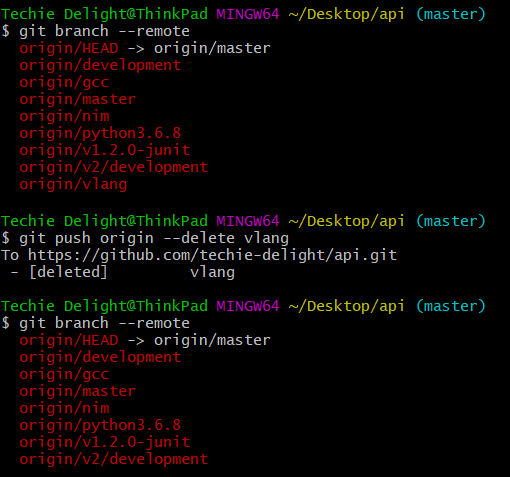
The process of deleting remote origin Git involves several key steps. Firstly, you need to identify the remote origin associated with your local repository. This can be done using the git remote -v command, which lists all the remotes configured for your repository, including the origin.
Once you have identified the remote origin, you can proceed to remove it using the git remote remove origin command. This command severs the link between your local repository and the remote origin, effectively deleting the remote origin from your local repository's configuration. It's important to note that this operation only affects the local repository and does not delete the remote repository itself or its contents.
Key Benefits and Crucial Impact
The ability to delete the remote origin in Git offers several significant benefits to developers and teams working on software projects. These benefits range from administrative convenience to enhanced security and data integrity.
"The freedom to delete a remote origin in Git empowers developers to adapt their workflows to changing project requirements, ensuring that version control remains a flexible and responsive tool in the software development process."
Major Advantages
- Flexibility in Project Management: Deleting the remote origin allows developers to easily transfer projects between hosting services or to start fresh repositories based on existing code without carrying over the history.
- Enhanced Security: In cases where a remote repository has been compromised, deleting the remote origin and setting up a new one can help contain the security breach and prevent further unauthorized access.
- Data Integrity: If the remote repository contains corrupt or outdated data, severing the connection and starting anew ensures that the local repository remains clean and reliable.
- Simplified Administration: For projects with complex histories or redundant remotes, deleting the remote origin can simplify repository management and make it easier to maintain a clean project structure.
- Migration and Collaboration: When migrating projects to new teams or organizations, deleting the remote origin and setting up a new one ensures a clean slate for collaboration, free from the baggage of past commits and histories.

Comparative Analysis
| Aspect | Delete Remote Origin | Other Version Control Systems |
|---|---|---|
| Flexibility | High - Allows for easy transfer and restarting of projects. | Varies - Some systems offer similar features, while others may lack the same level of flexibility. |
| Security | Enhanced - Helps contain security breaches and unauthorized access. | Mixed - Some systems may have built-in security features, while others rely on external tools. |
| Data Integrity | High - Ensures clean and reliable local repositories. | Varies - Depends on the specific system's ability to handle data corruption and outdated data. |
| Collaboration | Streamlined - Facilitates smooth transitions and clean slates for new teams. | Mixed - Some systems may have more robust collaboration features out of the box. |
Future Trends and Innovations
As Git continues to evolve, the landscape of version control systems is also undergoing significant changes. With the rise of cloud-based collaboration platforms and distributed development practices, the way developers interact with their version control systems is transforming.
In the future, we can expect to see further enhancements in Git's remote management capabilities, including more granular control over remote repositories and potentially more built-in security features. Additionally, as artificial intelligence and machine learning find their place in software development, we may witness intelligent version control systems that can automatically suggest or perform operations like deleting remote origins based on project health and team workflows.
Conclusion
The operation of deleting the remote origin in Git is a powerful tool in a developer's arsenal, offering flexibility, enhanced security, and data integrity. Understanding this process not only empowers developers to manage their repositories more effectively but also highlights the evolving nature of version control systems in response to the dynamic needs of software development.
As we've explored, the ability to delete the remote origin in Git is a multifaceted operation with significant implications for project management, collaboration, and data integrity. By leveraging this knowledge, developers can navigate the complexities of modern software development with greater confidence and efficiency.
Comprehensive FAQs
Q: What exactly does deleting the remote origin in Git accomplish?
A: Deleting the remote origin severs the link between your local repository and its primary remote repository (the origin). This means your local repository will no longer push or pull changes from the remote origin, effectively isolating it.
Q: Is deleting the remote origin a destructive operation?
A: In the sense that it disconnects your local repository from the remote origin, yes. However, it does not delete the remote repository itself or its contents. It's more like unplugging your local repository from the remote one.
Q: Can I undo the deletion of a remote origin?
A: Yes, you can re-add the remote origin using the git remote add origin [remote_repository_url] command. This will re-establish the connection between your local repository and the remote origin.
Q: What are some common scenarios where deleting the remote origin would be useful?
A: Common scenarios include transferring a project to a new hosting service, starting a fresh repository from an existing one without the history, containing a security breach, or simplifying repository management for complex projects.
Q: Does deleting the remote origin affect my local repository's history?
A: No, deleting the remote origin only affects the link to the remote repository. Your local repository's commit history remains intact. However, without a remote origin, you won't be able to push your local changes to a remote repository unless you set up a new one.
Leave a Comment
Comments are moderated before appearing. The data you submit is processed according to the Privacy Policy of fidespost.com.