How to Create Remote Repository GitHub for Professional Workflows
Modern software engineering relies heavily on the ability to synchronize local development environments with centralized cloud-based hosting. Without a structured method to create remote repository GitHub instances, individual developers risk data loss, versioning conflicts, and an inability to collaborate effectively within distributed teams. The transition from local-only coding to a distributed version control system marks the threshold between hobbyist experimentation and professional-grade production.
Establishing a remote destination for your code is not merely a storage task; it is the foundation of a continuous integration and continuous deployment (CI/CD) pipeline. When you decide to create remote repository GitHub assets, you are setting up a communication layer between your machine and the global development community. This layer manages permissions, tracks history, and provides a single source of truth that all stakeholders can access simultaneously.
This technical guide examines the precise methodologies required to initialize these remote environments. Whether you are starting a new project from scratch or migrating existing local files to a cloud server, understanding the nuances of the handshake between your local Git client and the GitHub servers is essential. We will analyze the protocols, the command-line sequences, and the strategic considerations that define successful repository management.

The Complete Overview of Creating Remote Repository GitHub Instances
At its most fundamental level, the process to create remote repository GitHub structures involves two distinct phases: the instantiation of a container on GitHub's servers and the subsequent linking of a local Git directory to that container. The remote repository acts as a centralized hub that holds the entire history of a project, including every commit, branch, and tag. This centralization allows for a distributed workflow where multiple engineers can push and pull changes without overwriting each other's progress.
The relationship between the local and the remote is governed by the concept of "remotes," which are essentially pointers to URLs. When a developer executes the command to create remote repository GitHub connections, they are defining a shortcut—usually named 'origin'—that tells the local Git software exactly where to send data. This architectural separation ensures that even if a local machine suffers a catastrophic hardware failure, the intellectual property remains secure and recoverable in the cloud.
Historical Background and Evolution
The necessity for remote hosting emerged from the limitations of early centralized version control systems like CVS and Subversion (SVN). In those older models, the server was a single point of failure and a bottleneck for performance. If the central server went offline, development essentially ground to a halt. The advent of Git, created by Linus Torvalds in 2005, revolutionized this by introducing a distributed architecture where every developer has a full copy of the project history locally.
Table of Contents
- The Complete Overview of Creating Remote Repository GitHub Instances
- Historical Background and Evolution
- Core Mechanisms: How It Works
- Key Benefits and Crucial Impact
- Major Advantages
- Comparative Analysis
- Future Trends and Innovations
- Conclusion
- Comprehensive FAQs
- Q: What is the difference between a local and a remote repository?
- Q: Do I need to have Git installed locally to create remote repository GitHub projects?
- Q: What is the most secure way to connect my local machine to a remote repository?
- Q: Can I turn an existing local project into a GitHub repository?
- Q: What happens if I delete a remote repository on GitHub?
- Q: Why am I getting a "permission denied" error when trying to push to a remote?
GitHub emerged shortly thereafter, providing a sophisticated web-based interface and social layer on top of the Git protocol. Before the widespread adoption of platforms like GitHub, developers had to manually manage server access via SSH or FTP, a process that was error-prone and lacked the intuitive pull-request workflow we see today. The ability to easily create remote repository GitHub environments democratized software development, allowing open-source projects to scale to thousands of contributors with minimal friction.
Core Mechanisms: How It Works
The mechanics of establishing a remote connection rely on the HTTPS or SSH protocols. When you initiate the steps to create remote repository GitHub links, you are essentially setting up an authentication handshake. Using SSH (Secure Shell) is generally preferred by professionals because it utilizes public-key cryptography, allowing for seamless, passwordless communication between your terminal and the GitHub servers. This ensures that only authorized users can modify the codebase.
Once the remote is established, the Git protocol uses a series of "refspecs" to determine which branches and commits need to be transferred. When you perform a 'git push', the local client calculates the difference between your local history and the remote history, then sends only the necessary objects (blobs, trees, and commits) to the server. This efficiency is what makes GitHub an industry standard; it minimizes bandwidth usage while maintaining perfect data integrity across the distributed network.
Key Benefits and Crucial Impact
Implementing a remote hosting strategy transforms a solitary coding session into a scalable enterprise operation. The primary impact is seen in the realm of risk mitigation. By offloading the primary record of a project to a managed service, organizations protect themselves against local data corruption and accidental deletions. Furthermore, the remote repository serves as the authoritative version of the software, which is critical for auditing and compliance in regulated industries.
Beyond security, the impact on team velocity is profound. Remote repositories facilitate asynchronous work, meaning a developer in Tokyo can push code that a developer in London can pull and review hours later. This "follow-the-sun" development model is only possible because of the robust infrastructure provided when you create remote repository GitHub workflows. It eliminates the need for constant manual hand-offs and provides a transparent log of every change made to the system.
"Version control is not just about saving your work; it is about managing the evolution of an idea through time and collaboration."
Major Advantages
- Centralized Truth: Provides a single, authoritative source for the codebase, preventing the "it works on my machine" syndrome.
- Collaborative Workflow: Enables features like Pull Requests and Code Reviews, which are essential for maintaining high code quality in team settings.
- Automated Integration: Acts as the trigger for CI/CD pipelines, allowing for automated testing and deployment every time code is pushed.
- Disaster Recovery: Offers a cloud-based backup of the entire project history, ensuring continuity in the event of local hardware failure.
- Open Source Contribution: Facilitates the ability to fork and contribute to global projects, expanding the reach and utility of software.

Comparative Analysis
| Feature | Local Repository Only | GitHub Remote Repository |
|---|---|---|
| Data Redundancy | Zero (Single Point of Failure) | High (Cloud-based Backups) |
| Collaboration | Manual File Sharing | Seamless via Push/Pull/PR |
| CI/CD Integration | Extremely Difficult | Native and Automated |
| Visibility/Audit | Private/Hidden | Transparent/Versioned History |
Future Trends and Innovations
The landscape of remote repository management is moving toward even deeper integration with Artificial Intelligence. We are beginning to see the rise of "AI-augmented" repositories, where the remote host does more than just store code; it actively analyzes it. Future iterations of GitHub will likely include more sophisticated automated reasoning tools that can suggest architectural improvements or identify security vulnerabilities during the very moment you attempt to create remote repository GitHub updates.
Additionally, the shift toward "Edge Computing" and decentralized hosting is gaining momentum. While centralized platforms like GitHub currently dominate, there is an increasing interest in protocols that allow for decentralized, peer-to-peer version control that maintains the same ease of use. This could lead to a hybrid future where the convenience of a managed UI meets the resilience of a truly decentralized network, further hardening the way we protect and share digital assets.
Conclusion
Mastering the ability to create remote repository GitHub instances is a fundamental requirement for any serious practitioner in the technology sector. It represents the transition from writing isolated scripts to building sustainable, collaborative software ecosystems. By understanding the underlying mechanics of Git, the protocols of secure communication, and the strategic advantages of remote hosting, developers can build workflows that are both resilient and scalable.
As the industry continues to evolve, the tools we use to manage our code will become even more integrated into our daily cognitive processes. However, the core principle remains unchanged: code is a living entity that requires a stable, shared environment to grow. Taking the time to properly configure your remote repositories today ensures that your projects are prepared for the complexities and collaborative demands of tomorrow.
Comprehensive FAQs
Q: What is the difference between a local and a remote repository?
A: A local repository resides on your personal computer and contains the full history of your project, allowing you to commit changes offline. A remote repository is hosted on a server (like GitHub) and serves as a central hub for sharing code, collaborating with others, and acting as a backup.
Q: Do I need to have Git installed locally to create remote repository GitHub projects?
A: Yes. While you can create a repository directly on the GitHub website using their web interface, you need the Git command-line tool installed on your machine to perform the actual synchronization (pushing and pulling) between your local files and the remote server.
Q: What is the most secure way to connect my local machine to a remote repository?
A: Using SSH (Secure Shell) keys is considered the professional standard for security. Unlike HTTPS, which often requires entering a Personal Access Token or password, SSH uses a pair of cryptographic keys to authenticate your machine, making it both more secure and more convenient for frequent use.
Q: Can I turn an existing local project into a GitHub repository?
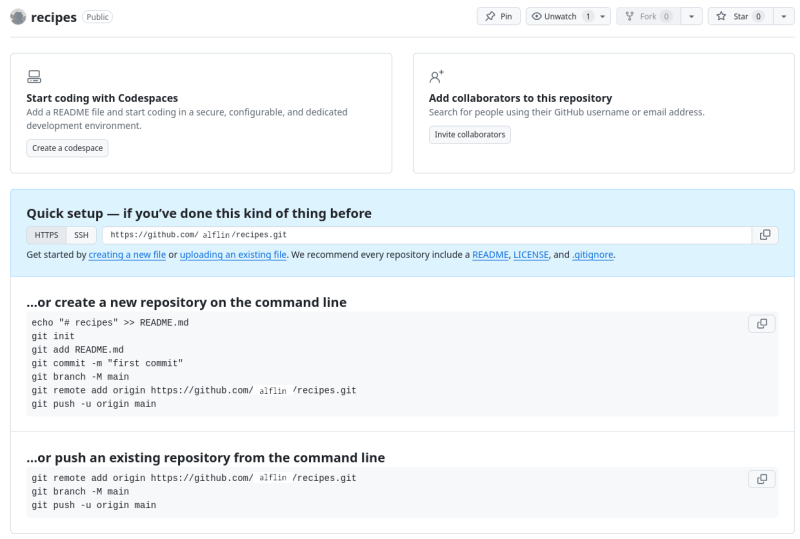
A: Absolutely. The process involves initializing a Git repository locally (if you haven't already), creating a new empty repository on GitHub, and then using the 'git remote add origin [URL]' command to link the two. After that, you can push your local history to the remote server.
Q: What happens if I delete a remote repository on GitHub?
A: Deleting a remote repository on GitHub removes the hosted version of your code, its issues, pull requests, and wiki from GitHub's servers. However, it does NOT delete your local repository. Your local code and history remain intact on your computer, but you will lose the ability to sync with the cloud until you create a new remote.
Q: Why am I getting a "permission denied" error when trying to push to a remote?
A: This error usually occurs due to an authentication failure. It typically means your SSH key is not added to your GitHub account, or you are attempting to push to a repository that you do not have write access to. Verify your credentials and ensure you are the owner or a collaborator on the target repository.
Leave a Comment
Comments are moderated before appearing. The data you submit is processed according to the Privacy Policy of fidespost.com.