Creating a Remote Git Repository: A Comprehensive Walkthrough
In the realm of software development, version control is an indispensable tool. At the forefront of this domain stands Git, a distributed system that has revolutionized collaborative coding. A crucial aspect of Git's functionality is the ability to create remote repositories, enabling developers to share, backup, and collaborate on projects seamlessly. This article delves into the intricacies of creating a remote Git repository, exploring its historical context, core mechanisms, benefits, and future prospects.
Whether you're a seasoned developer looking to deepen your understanding or a newcomer eager to master this essential skill, this guide will equip you with the knowledge and practical steps required to create remote Git repositories effectively. By the end, you'll not only grasp the 'how' but also the 'why' behind this fundamental practice.
In today's distributed work environments, the ability to create remote Git repositories is more important than ever. It facilitates seamless collaboration across geographical boundaries, ensures data redundancy, and fosters a culture of iterative development. Let's embark on this journey to uncover the power and potential of remote Git repositories.

The Complete Overview of Creating a Remote Git Repo
Creating a remote Git repository involves establishing a central, cloud-based storage location for your project's Git repository. This allows multiple developers to collaborate, push changes, and pull updates remotely. The process typically involves choosing a hosting service, initializing a repository, and linking it to your local Git repository.
Remote repositories serve as the backbone of collaborative development, ensuring that all team members are aligned with the latest code changes. They also act as a safety net, safeguarding your project's history in case of local system failures or missteps. Understanding how to create and manage these repositories is a cornerstone of effective software development in the modern era.
Historical Background and Evolution
The concept of distributed version control systems like Git emerged as a response to the limitations of centralized systems. Before tools like Git, Subversion, and Mercurial, developers relied on centralized servers to manage code changes. However, these systems often suffered from single points of failure, limited offline access, and challenges in handling complex branching and merging scenarios.
Table of Contents
- The Complete Overview of Creating a Remote Git Repo
- Historical Background and Evolution
- Core Mechanisms: How It Works
- Key Benefits and Crucial Impact
- Major Advantages
- Comparative Analysis
- Future Trends and Innovations
- Conclusion
- Comprehensive FAQs
- Q: What is the primary purpose of a remote Git repository?
- Q: Why is creating a remote repository better than relying solely on local repositories?
- Q: Which popular platforms can I use to create a remote Git repository?
- Q: How do I link a remote repository to my local Git repository?
- Q: What are some future trends in remote Git repository management?
Git, first released in 2005, introduced a paradigm shift by making each developer's working copy a full-fledged repository. This distributed model enabled developers to work offline, create branches, and merge changes with greater flexibility. The ability to create remote repositories further extended Git's capabilities, allowing for centralized collaboration while preserving the benefits of distributed version control.
Core Mechanisms: How It Works
Creating a remote Git repository involves several key steps. First, you need to choose a hosting service such as GitHub, GitLab, or Bitbucket. These platforms provide the infrastructure to store and manage your repository, along with additional features like issue tracking, continuous integration, and access control.
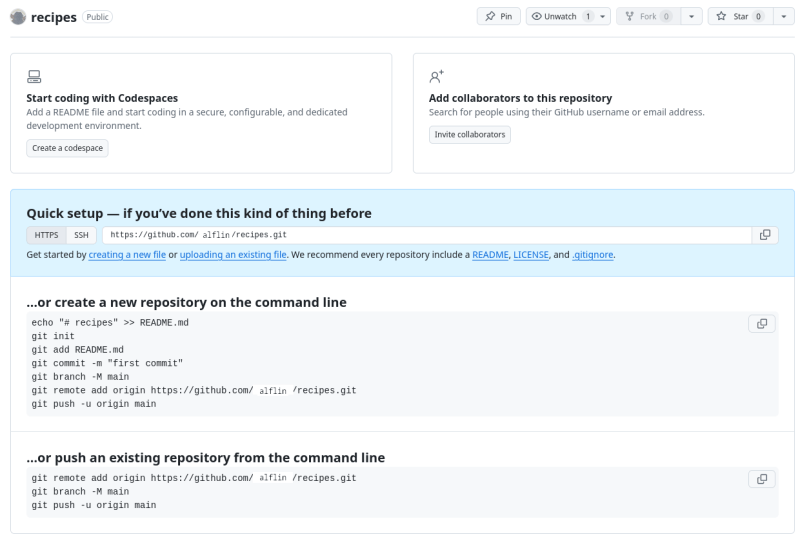
Once you've selected a hosting service, you'll create a new repository on the platform. This typically involves providing a repository name, description, and visibility settings (public or private). After the repository is created, you'll need to link it to your local Git repository using commands like git remote add origin <repository_url>. This establishes a connection between your local repository and the remote one.
Subsequently, you can push your local commits to the remote repository using the command git push origin main (or master, depending on your branch naming convention). This uploads your local changes to the remote repository, making them accessible to other collaborators. Conversely, you can pull changes from the remote repository using git pull origin main, ensuring your local repository is up-to-date.
Key Benefits and Crucial Impact
The ability to create remote Git repositories has a profound impact on software development, fostering collaboration, enhancing productivity, and improving code quality. Here are some of the major advantages:
"Remote repositories have transformed how we develop software, enabling global teams to work together seamlessly. They've made code review, branching, and merging more efficient, leading to faster development cycles and higher-quality code."
Major Advantages
- Seamless Collaboration: Remote repositories allow multiple developers to work on the same project simultaneously, contributing changes from anywhere in the world.
- Centralized Code Management: They serve as a central hub for all project-related code, ensuring that everyone is working with the latest version.
- Data Redundancy and Safety: Storing code in a remote repository provides a backup in case of local system failures or data loss.
- Efficient Code Review and Merging: Remote repositories facilitate streamlined code review processes, making it easier to catch bugs and improve code quality before merging changes.
- Enhanced Productivity: With real-time synchronization and access to the latest code, developers can work more efficiently and iteratively.

Comparative Analysis
| Feature | Remote Git Repo | Local-Only Repo |
|---|---|---|
| Collaboration | Multiple users can contribute simultaneously | Limited to single-user or local network collaboration |
| Data Safety | Cloud backup, less risk of data loss | Vulnerable to local system failures |
| Access | Accessible from anywhere with an internet connection | Limited to local machine or network |
| Scalability | Easily scales to accommodate larger teams and projects | Scalability restricted by local hardware and network limitations |
Future Trends and Innovations
As software development continues to evolve, the role of remote Git repositories is poised to expand further. Several trends and innovations are shaping the future of remote repository management:
- Enhanced Security: With the rise of remote work, ensuring the security of remote repositories is becoming a top priority. Expect to see advancements in encryption, access control, and threat detection mechanisms.
- AI-Powered Code Review: Artificial intelligence is being integrated into Git hosting platforms to automate code review processes, identifying potential issues and suggesting improvements.
- Improved Collaboration Tools: Future platforms will likely offer more sophisticated collaboration features, such as real-time code editing and advanced project management integrations.
- Seamless Integration with CI/CD Pipelines: Remote repositories will become even more tightly integrated with continuous integration and continuous deployment pipelines, streamlining the development-to-deployment process.
Conclusion
Creating a remote Git repository is not just a technical task; it's a gateway to collaborative, efficient, and secure software development. By understanding the historical context, core mechanisms, and key benefits of remote repositories, developers can harness their full potential. As the future of software development unfolds, remote Git repositories will continue to play a pivotal role, facilitated by advancements in security, AI, and collaboration tools.
Whether you're a novice or an experienced developer, mastering the art of creating remote Git repositories is an invaluable skill. It opens doors to global collaboration, enhances productivity, and ensures the safety and quality of your code. Embrace this powerful tool, and you'll be well-equipped to thrive in the dynamic world of software development.
Comprehensive FAQs
Q: What is the primary purpose of a remote Git repository?
A: The primary purpose is to provide a central, cloud-based location for storing and sharing a project's code among multiple developers, enabling collaboration, backup, and redundancy.
Q: Why is creating a remote repository better than relying solely on local repositories?
A: Remote repositories offer several advantages, including seamless collaboration, data safety through cloud backup, and accessibility from anywhere. They also facilitate efficient code review and merging processes.
Q: Which popular platforms can I use to create a remote Git repository?
A: Leading platforms include GitHub, GitLab, and Bitbucket. These services provide robust hosting, collaboration tools, and additional features like issue tracking and continuous integration.
Q: How do I link a remote repository to my local Git repository?
A: After creating the remote repository, use the command git remote add origin <repository_url> in your terminal. This establishes a connection between your local and remote repositories.
Q: What are some future trends in remote Git repository management?
A: Key trends include enhanced security measures, AI-powered code review, improved collaboration tools, and seamless integration with CI/CD pipelines. These advancements aim to make remote repository management more efficient and secure.
Leave a Comment
Comments are moderated before appearing. The data you submit is processed according to the Privacy Policy of fidespost.com.